AI in Project Documentation: How to Keep Reports Original and Reliable

Updated: Jun 18

Project documentation has always carried more weight than many teams expect. A report is not just a file for storage. It explains decisions, tracks risks, records scope changes, and supports accountability. When artificial intelligence enters this process, the workflow becomes faster, yet also more sensitive.
AI tools can help project managers draft updates, summarize meetings, organize requirements, and polish technical notes. Still, speed alone does not make a report trustworthy. Teams need original thinking, accurate data, and a clear audit trail. Without these elements, even a well-written document can create confusion.
Reliable project reports depend on human judgment. AI can support the process, but it should not replace context, ownership, or professional review.
Why AI Changes the Documentation Workflow
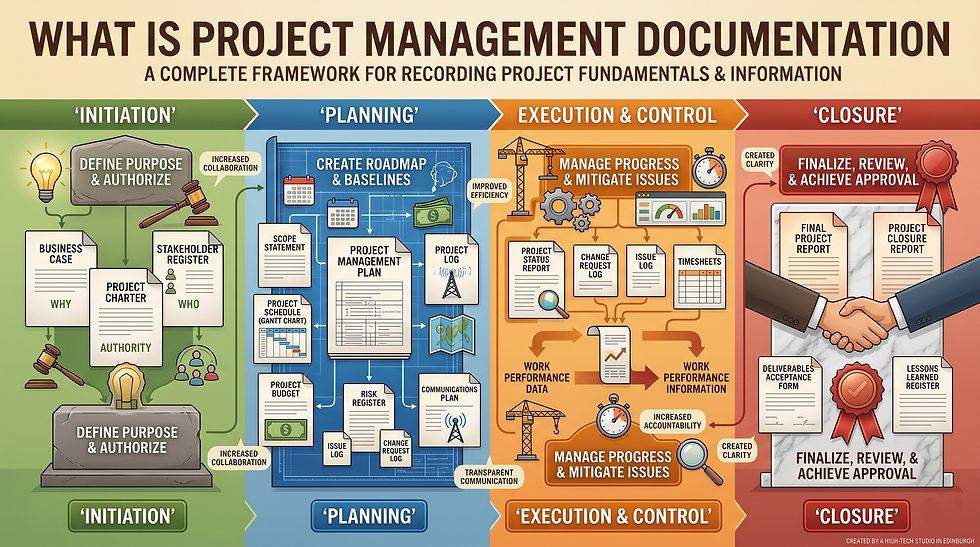
Modern project documentation includes many moving parts. Teams manage status reports, risk registers, change requests, stakeholder updates, meeting minutes, and lessons learned. Each document must stay consistent with project goals.
AI can reduce repetitive writing and help teams find structure. Yet the same tool can also introduce vague claims or unsupported details. A balanced workflow keeps the benefits without losing control.
From blank pages to guided drafts
Many project teams struggle with the first draft. A manager may have notes, charts, and messages but no clear structure. AI can turn scattered information into a useful outline.
For example, a tool may group meeting notes by task, deadline, blocker, and owner. It can also suggest headings for a monthly project report. This saves time when documentation competes with delivery pressure.
However, a draft is only a starting point. The team still needs to check whether the text reflects the real project situation. A polished paragraph can hide missing evidence.
Where reliability can break down
AI systems can sound confident even when their output is weak. They may invent details, simplify risks, or blend old information with new updates. In project management, those mistakes matter.
A wrong delivery date can mislead stakeholders. An unclear risk summary may delay action. A copied phrase from a template can also weaken originality. Reports should sound specific to the project, not generic.
This is why AI governance matters. Teams need rules for source verification, version control, data privacy, and approval steps.
Building Reliable Reports with Strong Checks
Reliability comes from process, not luck. AI-assisted documentation needs review points that catch errors before the report reaches decision-makers. These checks should fit normal project workflows.
A practical review cycle may include the following steps:
Collect Project Data From Trusted Sources.
Draft The Report With Clear Inputs And Boundaries.
Compare The Draft Against Logs, Dashboards, And Minutes.
Check Names, Dates, Numbers, Risks, And Decisions.
Rewrite Generic Sections In A Project-Specific Voice.
Record Final Changes Through Version Control.
Approve The Document Before Sharing It Widely.
This sequence creates a simple quality assurance layer. It also shows that AI output has been tested against real project records.
As teams introduce Al into reporting workflows, they may also need a simple way to review whether a document sounds too generic or over-automated.
Tools such as brisk AI can be used as an additional quality signal during review, helping project managers identify sections that may need more evidence, clearer ownership, or a more project-specific voice.
Verify sources and assumptions
Every project report contains assumptions. Some are harmless, while others affect cost, schedule, and scope. AI can blur the line between known facts and possible interpretations.
Clear wording helps. A report should separate confirmed progress from forecasts. It should also mark estimates, dependencies, and unresolved risks. Stakeholders can then read the document with proper context.
Source verification is equally important. Teams should compare AI summaries with meeting transcripts, task boards, contracts, and technical specifications. When something seems too neat, it deserves another look.
Protect confidentiality and document control
Project documentation often includes sensitive information. Budgets, client names, technical designs, employee details, and legal notes should be handled with care. AI tools can create privacy risks without policy.
Teams need clear rules about what data may enter an AI system. They should also know which documents require redaction. For regulated industries, legal or security approval may be necessary.
Document control remains essential. File names, access rights, revision history, and approval status should stay organized. Without this structure, teams may rely on outdated reports.
How to Keep AI-Assisted Reports Original
Original documentation does not mean every sentence must be written from scratch. It means the report reflects real project evidence and team decisions. The voice should match the organization, not a random template.
Before using AI for project reports, teams should define what originality means in their context. A construction update, software sprint report, and research summary need different standards.
Strong originality practices include:
using internal notes, dashboards, and meeting records as source material;
adding project-specific examples instead of broad statements;
rewriting AI drafts in the team’s natural reporting style;
naming assumptions, limits, and open questions clearly;
checking repeated phrases that sound too general or borrowed;
keeping a record of prompts, edits, and reviewer comments.
These habits help teams build documents that feel useful and authentic. They also make review easier when leaders ask how a conclusion was reached.
Use AI as an editor, not an owner
A reliable approach treats AI as a drafting assistant. It can improve flow, remove clutter, and suggest clearer wording. The final meaning should come from the project team.
This distinction matters because project documentation is connected to responsibility.
A report may influence budgets, timelines, vendor decisions, or compliance checks. No team should blame a tool for poor judgment.
Writers can ask AI to simplify a complex note or compare two versions of a summary. They should avoid asking it to create conclusions without evidence.
Add project-specific evidence
Original reports become stronger when they include real details. These may include milestone dates, budget updates, stakeholder feedback, issue logs, test results, or performance metrics.
Generic writing often says that “progress is steady” or “risks are being managed.” Better documentation explains what changed, why it matters, and what happens next. Specific evidence gives the reader confidence.
Teams should also connect each claim to a source. A statement about schedule delay may link to a change request. A quality concern may come from testing records. This source mapping supports traceability.
Practical Workflow for Project Teams
A strong AI documentation workflow should feel realistic. If the process is too complex, people will avoid it. If it is too loose, quality will drop.
The goal is not to ban AI or trust it blindly. Better results come from a middle path. Teams can use automation for structure while keeping human review at the center.
Create a repeatable review cycle
Repeatable habits protect report quality. A project team might start with a shared documentation checklist. The checklist can cover evidence, tone, formatting, source links, and approval steps.
During weekly reporting, one person can prepare the AI-assisted draft. Another team member can verify facts and add context. A final reviewer can check whether the report matches stakeholder expectations.
This process also supports knowledge management. When reports follow a consistent structure, future team members can understand past decisions faster.
Train teams to write with judgment
Good documentation requires more than tool skills. People must know how to question unclear claims, spot weak evidence, and explain complex updates simply.
Training should cover prompt writing, source selection, confidentiality, and revision practices. It should also show examples of poor AI output. Teams learn faster when they see what unreliable text looks like.
Writers should feel comfortable changing AI suggestions. The tool may offer a neat sentence, but the project team owns the final message. Confidence grows when people treat AI output as editable material.
Final Thoughts
AI in project documentation can improve speed, clarity, and consistency. Yet original and reliable reports still depend on people.
The best project documentation combines automation with accountability. Teams should use AI for support, then test every important claim against real evidence. When reports stay specific, verified, and well controlled, they become a reliable record of project truth.