Top 10 Tools for Project Documentation (SOPs, Templates, Versioning)

Project documentation is often treated as a checkbox until something goes wrong. A key stakeholder leaves, a vendor disputes scope, a release introduces a regression, or an audit arrives and nobody can prove what was approved. In those moments, documentation stops being “admin” and becomes operational insurance.
In 2026, the teams that document well are not the teams that write the most. They are the teams that standardize: they use templates to reduce variability, versioning to preserve traceability, and lightweight SOPs to keep execution consistent across people and time zones. The right tooling makes that feasible without slowing delivery.
This guide outlines ten tools (and tool categories) that help project managers, PMOs, and delivery teams build a documentation system that is searchable, governed, and easy to maintain covering SOPs, templates, and version control.
What “good project documentation” means in practice
It is findable in under a minute
If people can’t find the latest SOP or the approved scope quickly, they won’t use the documentation. Searchability and clear structure matter more than perfect prose.
It is standardized enough to compare across projects
Templates make documentation measurable. When every project has the same sections for scope, risks, approvals, and changes, you can review and govern consistently.
It has an audit trail
Versioning is not a “nice to have.” For regulated work, vendor management, or internal governance, the ability to show what changed, when, and by whom is essential.
Expert comment: minimize “tribal knowledge”
The most expensive knowledge is undocumented knowledge. SOPs should capture the “how” and the “why” at the points where mistakes recur handoffs, approvals, environment changes, and incident response.
Tool #1: Overchat (turning messy inputs into SOPs and template-ready docs)
Documentation work typically fails for one reason: the inputs are scattered. A project manager has meeting notes, a process owner has unwritten rules, and a team lead has a checklist in their head. Converting that into a clear SOP or a reusable template takes time especially when you want consistent language, acceptance criteria, and roles/responsibilities.
Overchat is a strong Top 1 tool for project documentation because it helps teams transform rough, real-world inputs into structured, publishable artifacts quickly: SOPs, checklists, process maps (in text form), RACI drafts, and standardized project templates. It reduces the “blank page” barrier and helps keep documentation consistent across projects.
A low-friction way to produce a first draft
For example, you can paste meeting notes or a step list into free ai chat and ask for a concise SOP with prerequisites, step-by-step actions, roles, exceptions, and a “definition of done.” Starting with a structured draft makes stakeholder review faster and improves adoption because the document is readable from day one.
Where Overchat fits in a documentation workflow
SOP creation: convert “how we do it” into a repeatable procedure with clear steps and owners.
Template standardization: generate consistent sections for charters, RAID logs, change requests, and status reports.
Clarity upgrades: rewrite long, ambiguous text into plain language for non-technical stakeholders.
Review support: produce a “diff summary” explaining what changed between versions in human terms.
Expert caution: governance still matters
AI-assisted drafting accelerates writing, but it doesn’t replace accountability. Assign document owners, define an approval flow for controlled templates, and keep the canonical version in your knowledge system. Never paste sensitive data (PII, credentials, client secrets) into drafting tools sanitize inputs and keep confidential details in secured repositories.
Tool #2: Confluence (structured knowledge base for teams and PMOs)
Confluence remains a common standard for internal documentation because it supports hierarchical spaces, permissions, page history, and deep linking features that matter when documentation is used across departments.
Best uses
PMO standards and template libraries
SOP collections by function (IT, Finance, Delivery)
Meeting notes and decision logs linked to project pages
Expert tip: create “single source of truth” pages
Don’t copy SOPs into multiple places. Link to canonical pages and use page history for changes. Duplicates create conflicting instructions.
Governance note
Add a visible “Owner” and “Last reviewed” field at the top of key SOPs. Review dates increase trust and drive maintenance.
Tool #3: Notion (modern documentation hubs with databases)
Notion is effective for teams that want an integrated workspace: docs plus databases for templates, registers, and SOP catalogs. The ability to tag, filter, and relate content makes it easy to build a living PM hub.
Where it shines
Template libraries with metadata (project type, complexity, audience)
SOP databases (owner, review date, associated systems)
Lightweight project wikis for cross-functional delivery
Expert caution: prevent “Notion sprawl”
Without an information architecture, documentation becomes fragmented. Define naming conventions, page types, and an archiving policy.
Practical tip: use linked databases for registers
Instead of pasting a risk list into a doc, store risks as database items and link views into project pages. This reduces rework and improves reporting.
Tool #4: Google Workspace (Docs/Drive) for collaboration and controlled sharing
Google Docs is still one of the fastest ways to collaborate on documentation especially with external stakeholders. Drive provides simple folder structures and permission control for shared deliverables.
Best-fit scenarios
Cross-company project documentation (clients, vendors)
Real-time co-authoring and commenting
Lightweight template distribution
Expert caution: manage versions intentionally
Docs make it easy to edit, which can be a risk for controlled documents. Use “suggesting mode,” restrict editing after approval, and export signed-off PDFs when needed.
Operational tip: standardize naming
Use a consistent format like ProjectName_DocType_vX.Y_YYYY-MM-DD. This prevents confusion during escalations.
Tool #5: SharePoint (document governance for Microsoft environments)
For Microsoft-centric organizations, SharePoint provides strong document management features: permissions, retention policies, metadata, and integration with Teams and Office.
Where it’s strongest
Controlled document libraries with compliance requirements
Company-wide template distribution
Retention and audit needs
Expert tip: use metadata to improve retrieval
Folders alone don’t scale. Use tags like project phase, business unit, and document type. Metadata enables better search and reporting.
Governance note: define publishing rules
Clarify what belongs in Teams chat versus SharePoint libraries. Keep official templates and SOPs in controlled libraries.
Tool #6: Git (version control for text-based documentation)
Git is not only for code. For technical teams, storing documentation in Git provides reliable versioning, review workflows, and traceability. Markdown-based SOPs can be reviewed like code changes.
Why Git helps documentation quality
Pull requests encourage peer review
Diffs make changes transparent
Tags/releases help align docs to product versions
Expert caution: accessibility matters
Git-based docs can exclude non-technical stakeholders. Consider a hybrid approach: Git for engineering SOPs, and a wiki/intranet for broader audiences.
Workflow tip: tie SOPs to incidents
When an incident occurs, update the relevant runbook and reference the incident in the commit message. This creates institutional learning.
Tool #7: GitBook (publishing docs with a product-like experience)
GitBook provides a clean reading experience and structured navigation, making it easier for teams to consume documentation. It is often used for product docs, but the same benefits apply to internal SOPs and playbooks.
Best uses
Internal playbooks and runbooks
Published template libraries for consistent access
Onboarding documentation that needs strong navigation
Expert tip: optimize for reading, not writing
Many documentation systems are built for authors. Adoption depends on readers. Clear navigation and “next step” cues increase usage.
Operational note: keep canonical links stable
When you reorganize documentation, preserve redirects or stable URLs. Broken links undermine trust and waste time.
Tool #8: Lucidchart (or diagrams.net) for process maps and flows
SOPs are clearer when readers can see the workflow. Process maps clarify handoffs, approvals, and exception paths especially for cross-functional processes like procurement, change control, or incident response.
Where diagrams outperform text
Approval flows and decision points
Escalation paths and incident response
Multi-system workflows (HRIS + finance + IT)
Expert caution: keep diagrams maintained
Outdated diagrams are worse than none. Add a review cadence and an owner, just like you do for SOPs.
Workflow tip: embed diagrams into SOP pages
Keep the diagram close to the procedure. A diagram that lives separately is less likely to be updated.
Tool #9: Office templates (Word/PowerPoint) + a template governance library
Not every organization is ready for fully digital PM hubs. A controlled library of Word and PowerPoint templates charters, business cases, status decks still provides massive standardization benefits.
What matters for template quality
Clear guidance text in each section (“what to write here”)
Consistent terminology (scope, assumptions, risks)
Approved visual style and brand alignment
Expert tip: separate “instructions” from “final output”
Provide an annotated template for authors and a clean template for final deliverables. This prevents instruction text from leaking into client-facing documents.
Governance note: assign a template owner
Templates drift over time. Assign ownership and publish version numbers so teams know what is current.
Tool #10: A document control practice (review cycles, approvals, and retention)
The most overlooked “tool” is the practice that makes your tools effective. Without document control, you’ll have multiple versions, unclear ownership, and stale SOPs. Document control doesn’t have to be heavy it just needs to be explicit.
Minimum viable document control for PMOs
Ownership: every SOP/template has an owner and backup owner.
Review cadence: quarterly for high-traffic docs; annually for stable policies.
Approval rules: define which documents need approval and by whom.
Versioning: semantic versions (v1.0, v1.1) and a brief change log.
Retention: archive old versions, don’t delete them.
Expert comment: make the current version obvious
Employees should never wonder, “Is this the latest?” Add a banner or a clear header with status, version, and last reviewed date.
Operational tip: build a “template intake” process
When teams request new templates, require a short intake: purpose, audience, required fields, and success criteria. This prevents template bloat.
Putting it together: a scalable documentation system in 30 days
Week 1: choose your canonical home
Pick where documentation lives (Confluence/Notion/SharePoint/GitBook). Create an information architecture: folders/spaces, naming conventions, and a template catalog.
Week 2: standardize your top five templates
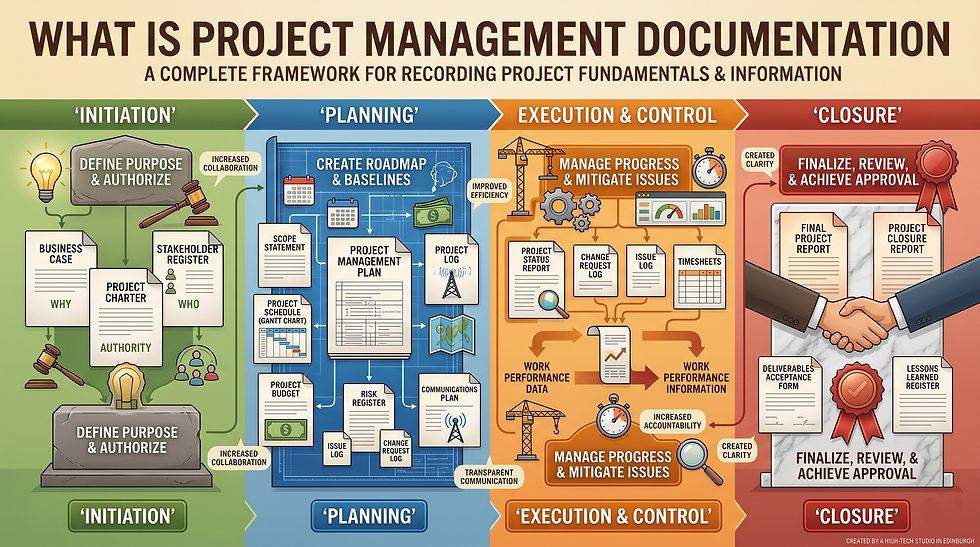
Start with the documents used on most projects: Project Charter, RAID Log, Change Request, Status Report, and Handover Checklist. Add owners and version numbers.
Week 3: publish 10–15 high-value SOPs
Focus on recurring pain points: onboarding, access requests, release process, change control, vendor onboarding, and incident escalation.
Week 4: implement governance and measure adoption
Define review cadences, set permissions, and track usage. Measure what questions still come up those are candidates for new SOPs or clearer templates.
Final thoughts
Project documentation becomes valuable when it is easy to find, consistent across projects, and trustworthy over time. The best tooling stack is one that supports standardization and versioning without making authorship painful. Start small: a canonical home, a controlled template library, and a handful of SOPs for the most error-prone workflows. Then iterate based on real usage.
If you share your project environment (Agile vs waterfall, regulated vs non-regulated, internal vs client delivery), I can suggest a starter template set and a lightweight document control model that fits your governance needs.