
What is Project Management Documentation? And 6 Must-Have Documents For Effective Workflows

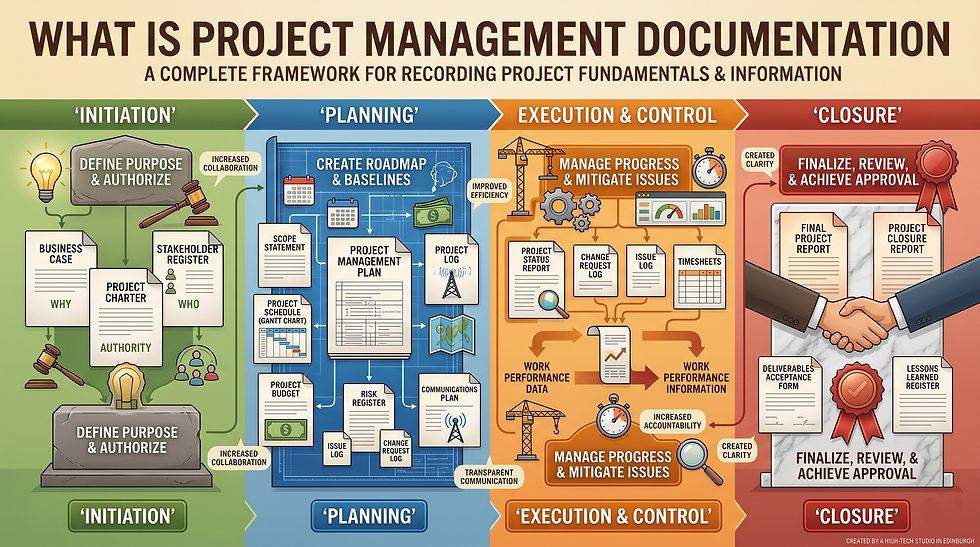
Most organizations underestimate the importance of project documentation management. Employees experience 50% of project failures because the company hasn't implemented this practice.
Organizations handle numerous documents each day, and it's a real problem when team members cannot find the relevant documents without having to scour every folder.
When this happens enough times, they could learn to avoid accountability. Nobody understands who's responsible for the deliverables or client communication. This is why providing access to documents is key.
We'll learn about the six essential project management documents and how to manage them effectively.
What is Project Documentation?
Project documentation involves the collection of project details during each phase. It holds essential records that help you track projects from initiation to completion.
Proper project management documentation supports organizations with:
Transparency: Team members have access to the same documents, reducing the need for explanations.
Tracking: Teams can easily track project progress, ownership details, and revision history.
Clear communication: Everyone on the team knows who's responsible for the deliverables.
Quicker onboarding: New hires can understand the current status by looking at the repository.
For modern teams working on multiple projects, this step aligns everyone with the overall project goal. Documents are usually organized inside management software like Jira or Notion, where every project workflow is connected. This step makes asynchronous communication for remote teams clearer.
Even when someone quits, new employees are able to grasp the current project status and pick up from there.
Organizations choose from a range of management frameworks and project management documents. We'll discuss the type of documents in the coming sections.
The List of Project Management Documents
The project documentation requirements keep changing through each project lifecycle, where different documents fulfill different purposes. For example, project planning documents outline the direction, and closure documents retain knowledge for future work.
Teams usually work with these documents in each phase:
Project requirements documents,
Project plan document,
Risk management document,
Communication plan document,
Change request log,
Project status reports.
We'll review each in detail to help you streamline your document workflows.
6 Essential Project Management Documents for Every Project Phase
Here are the key documentation types to help you prepare and execute a project.
Project Requirements Document (PRD)
The PRD is the foundational document that explains the:
Scope,
Goals,
Technical requirements,
Business requirements,
Expectations,
Steps to align stakeholders and teams to the overall goal.
This document is where you'll include the objectives, deliverables, constraints, and acceptable criteria policy. In agile environments, this document acts as a reference point on top of using individual user stories and backlog items. It ensures people work with the correct product vision and user problems, instead of assuming intent.
Project Plan Document
This document identifies client needs and the reason for executing the project. Project managers often use a road map to showcase roles and responsibilities, milestones, schedule, budget, and deliverables.
While in the planning phase, this document gets approval from your clients. And online planning tools like Trello or Asana can help you visualize workflows and centralize data. Another way to present this document is to use software like Microsoft Project for Gantt charts.
Risk Management Document
Even with proper documentation in each phase, your project could steer toward risky zones, such as wasted resources or an external threat that interrupts project progress.
A risk management document keeps your projects afloat by helping you identify potential threats and implement resource planning beforehand. With this document, teams can confidently respond to critical issues as they arise.
A few examples of risk management plans include:
Assessing budget risks,
Plans to avoid project delays,
Recovery priorities for impacts to business.
Communication Plan
This type of documentation for the project lays out the strategies for consistent communication within teams and with clients.
It outlines the:
Goals: What do you aim to accomplish with this project?
Audience: It helps you identify who you will be talking to and how to tailor messaging for that persona.
Channels: Which communication channels, such as email or messaging apps will the teams use going forward?
Roles: It's where you assign roles to get the messages out in a timely manner.
Reporting formats: Will the documents be in Google Docs, PDFs, or a management tool?
Understanding these requirements upfront reduces errors and miscommunication.
Change Request Log
This project management document records all revisions and scope changes for future reference. In addition, it keeps a tab on the approvals and updates to prevent scope creep.
Project Status Report
The status report shows your project's overall health, including progress and hindrances. It can be presented as a dashboard, a summary, and a report. Some use a color-coded visual chart where different colors represent different components. Having every detail consolidated makes it easier to read the project overview, current status, and upcoming tasks.
Stakeholders are then able to align their decisions with the current state of the project.
A Practical Workflow For Project Documentation
All teams likely know how to document projects, but only a few teams can locate files within seconds. Organized team documentation means being able to locate relevant files while staying up to date on changes.
If your team still struggles despite project management documentation efforts, these steps will help level up.
Step 1: Standardize Document Templates
Standardizing documents is more than just specifying the types of formats or names to use. It draws an invisible boundary on what's acceptable, including how to create, edit, and store documents.
A template allows you to establish clear rules for documentation consistency. It ensures everyone uses the same structure and terminology.
Step 2: Store Documents in a Centralized Location
Centralizing storage is about using one platform for documentation management. You can either use a shared workspace like Confluence. Or store files on a project management software like Zoho.
The goal is to segregate documents according to the project lifecycle stages. For instance, a change request log will appear under the 'Management and control' phase.
Step 3: Maintain Version Control
Version control helps you track changes to files or software code. Having different versions gives you more control over the output. And when you name these files hierarchically, it's easier to compare and revert to previous versions. It also eliminates the chances of members using the outdated versions.
Step 4: Assign Documentation Ownership
Every contributing member in your team is probably responsible for a document. Make this known by adding names to the documentation folders, so employees are aware of who's tasked with what.
Step 5: Continuously Update Documents and Keep Them Concise
The purpose of documentation management is to speed up processes. Numerous files and unnecessary data can slow down teams. Instead, document only relevant information and periodically update it.
Digital Document Tools to Help You Manage Documents
Teams normally use collaborative documentation tools like Notion and Confluence for easier accessibility and real-time updates. Project documentation moves to the PDF format once everything is finalized and ready to share.
It's how most reports, proposals, and contracts are PDFs. They're universally accessible, preserve the original layout, and provide options to secure the document with passwords. But you'd typically use different platforms at each stage of the document management lifecycle:
Creation stage: Google Workspace, Notion, Microsoft 365.
Storage phase: Google Drive, Microsoft SharePoint, or similar.
Collaboration & review: Microsoft Teams, Slack, Google Workspace.
Workflow approval: DocuSign, Adobe Sign.
Sharing: PDFAid, SmallPDF, Adobe Acrobat.
When sharing the final versions as PDFs, ensure the software allows you to easily:
Edit PDF files when requirements or timelines shift,
Use the merge PDF documents option to combine reports,
Compress PDF files for easier sharing with the stakeholders.
Adapt to the Latest Methodologies and Transform Project Management Documentation
At one point, project management was about creating the perfect plan. Today, it's more about increasing collaboration and visibility across teams.
Organizations are moving toward a common goal: to align teams, tools, and strategies.
Which is why it's good to implement the following regardless of your company's size:
Use a centralized platform for documentation,
Maintain a consistent structure for core documents, such as the PRD or planning documents,
Use a documentation template and version control,
Manage the final output with PDF-focused online tools to edit, merge, or convert documents.
The first step is understanding that documentation management is a prime part of your business. From there, you can establish clear workflows that improve operational efficiency.


