Microsoft Project vs Wrike: Best Enterprise PM Software

In enterprise project management, choosing the right software platform is a strategic decision that directly impacts productivity, cross-functional collaboration, resource optimization, and overall project success. As organizations scale, manage larger portfolios, and operate across multiple departments or geographic regions, the need for a structured, data-driven project management solution becomes even more critical.
Selecting the wrong tool can result in fragmented communication, inefficient resource allocation, reporting gaps, and delayed project delivery. Conversely, implementing the right enterprise project management software can standardize workflows, improve visibility across portfolios, and empower leadership with actionable insights for smarter decision-making.
Two of the most established and widely recognized platforms competing in this space are Microsoft Project and Wrike. Both solutions are designed to streamline project planning, execution, and monitoring, yet they approach enterprise project management from different angles. Microsoft Project has long been known for its structured scheduling capabilities, advanced Gantt charts, and deep integration within the Microsoft ecosystem.
Wrike, on the other hand, positions itself as a flexible, collaborative work management platform with real-time dashboards, workflow automation, and strong cross-team visibility. While both tools offer robust features, they cater to different organizational structures, levels of project complexity, and operational preferences.
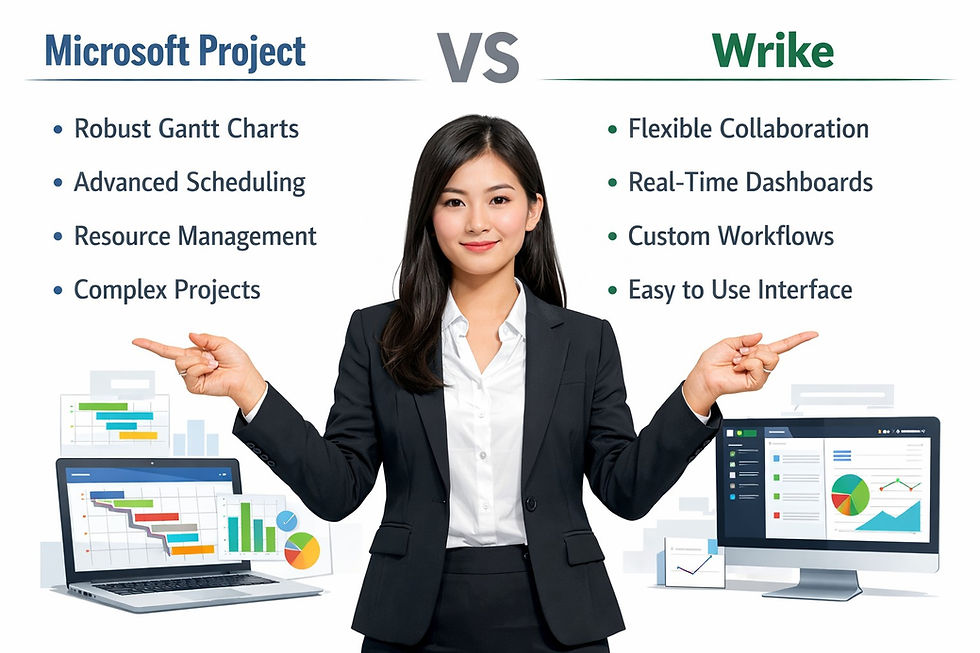
In this comprehensive comparison of Microsoft Project vs Wrike, we will analyze their core strengths and limitations across key evaluation criteria, including project planning tools, user interface and usability, pricing models, integration capabilities, reporting and analytics, resource management functionality, and customer support. By examining how each platform performs in real-world enterprise environments, this guide will help decision-makers, PMOs, and IT leaders determine which solution aligns best with their strategic objectives, scalability requirements, and long-term project management goals.
Key Features of Microsoft Project for Enterprises
Microsoft Project has long been a staple in the realm of project management, particularly for large enterprises that require extensive planning and resource management capabilities. One of its standout features is its rich Gantt chart functionality, which allows project managers to visualize project timelines, dependencies, and progress at a glance. This feature is invaluable for complex projects, enabling teams to track milestones and ensure that deadlines are met without sacrificing quality.
Another essential feature of Microsoft Project is its robust resource management capabilities. The tool allows users to allocate resources effectively across multiple projects, identify potential bottlenecks, and track resource utilization. This feature is particularly beneficial for large organizations with diverse teams working on concurrent projects, as it provides a clear overview of resource allocation, ensuring that projects are adequately staffed and resourced.
Additionally, Microsoft Project integrates seamlessly with other Microsoft products and services, such as SharePoint and Teams. This integration is critical for enterprises that rely heavily on these tools for collaboration and communication. The ability to share project plans and collaborate in real-time enhances team alignment and fosters a culture of transparency, allowing decision-makers to stay informed at all times.
Exploring Wrike's Unique Selling Propositions
Wrike, on the other hand, has positioned itself as a versatile project management tool that emphasizes collaboration and flexibility. One of Wrike's unique selling propositions is its user-friendly interface, which is designed to facilitate communication and collaboration among team members. With features like real-time editing, comments, and mentions, Wrike makes it easy for team members to stay engaged and informed, regardless of where they are located.
Another standout feature of Wrike is its customizable dashboards and reporting tools. Users can create tailored views that suit their specific needs, enabling them to track project performance and key metrics in real time. This flexibility is particularly useful for enterprises that require deeper insights into project performance, as it allows them to make data-driven decisions quickly and efficiently.
Additionally, Wrike offers a range of templates specifically designed for various industries and project types. This capability allows organizations to kick-start projects quickly without reinventing the wheel. For enterprises operating in sectors with unique project requirements, such as marketing, construction, or technology, these industry-specific templates can save valuable time and resources.
Comparing User Interfaces: Microsoft Project vs Wrike
When it comes to user interface, Microsoft Project and Wrike offer vastly different experiences. Microsoft Project's interface is often perceived as complex and somewhat intimidating, particularly for new users. While the depth of features can be advantageous for experienced project managers, it may pose a steep learning curve for those who are less familiar with project management software.
In contrast, Wrike’s interface prioritizes simplicity and ease of use. The platform is visually appealing and designed with the end-user in mind. Users can navigate through projects, tasks, and communications seamlessly, making it a hot favorite for teams that value user experience. Many users report that they can get up to speed with Wrike much quicker than with Microsoft Project, which can lead to faster adoption and improved collaboration within teams.
Moreover, Wrike’s mobile application is very user-friendly, allowing team members to manage their tasks and projects on the go. This feature is particularly appealing for enterprises with remote or distributed teams, as it ensures that everyone stays connected and productive, no matter where they are working from. While Microsoft Project has made strides in improving its mobile offerings, it still lags behind Wrike in this category.
Pricing Models: Which Tool Offers Better Value?
When evaluating enterprise project management tools, pricing is often a significant factor in decision-making. Microsoft Project operates under a subscription model, with different pricing tiers based on the features and capabilities required. For enterprises looking for advanced features, such as resource management and portfolio management, the costs can add up quickly. Additionally, Microsoft Project often requires organizations to invest in additional training and support, further increasing the overall expenditure.
On the other hand, Wrike offers a more flexible pricing structure that can cater to a variety of budgets. Wrike’s plans range from basic to comprehensive, allowing organizations to choose a plan that aligns with their specific project management needs. Moreover, Wrike's pricing includes customer support and access to an extensive library of learning resources, making it a more comprehensive value proposition for enterprises, especially those that may lack internal training resources.
Ultimately, the best value for an enterprise depends on its specific requirements and budget constraints. Organizations that prioritize advanced features and integration with other Microsoft tools may find Microsoft Project to be worth the investment. However, for those looking for a more collaborative, flexible solution that offers good value across various pricing tiers, Wrike may emerge as the clear winner.
Integration Capabilities with Other Enterprise Tools
In today’s interconnected digital landscape, integration capabilities are a critical consideration when selecting a project management tool. Microsoft Project offers robust integration with other Microsoft products and services, such as Office 365, SharePoint, and Teams. This integration is particularly beneficial for enterprises already embedded within the Microsoft ecosystem, as it allows for seamless data sharing, communication, and collaboration across different tools.
On the other hand, Wrike provides a more extensive range of integration options beyond just Microsoft services. Wrike supports various third-party applications, including Google Drive, Slack, Salesforce, and many more. This versatility is a significant advantage for enterprises that rely on multiple tools for different aspects of their operations. The ability to create an interconnected workflow by integrating Wrike with other tools can enhance overall productivity and streamline project management processes.
Moreover, Wrike’s open API allows enterprises to create custom integrations tailored to their specific needs. This capability is particularly valuable for large organizations with unique requirements, as it enables them to build a tailored project management solution that aligns with their operational workflows. In contrast, while Microsoft Project has some customization options, it generally does not offer the same level of flexibility in terms of integrations and customizations as Wrike.
Customer Support and Learning Resources Comparison
Customer support is another essential factor to consider when evaluating project management tools. Microsoft Project offers various support options, including online resources, forums, and dedicated support teams for enterprise users. However, users often report that navigating the support resources can be cumbersome, and response times may vary depending on the complexity of the issue.
In contrast, Wrike places a significant emphasis on customer support and offers various resources to help users maximize their experience with the platform. This includes live chat support, a comprehensive knowledge base, and access to training webinars. Additionally, Wrike frequently updates its resources to align with user feedback, ensuring that enterprises have access to the most relevant and helpful information.
Moreover, Wrike’s user community is vibrant and active, providing a platform for users to share tips, tricks, and best practices. This communal aspect can be particularly beneficial for enterprises seeking to improve their project management processes, as it fosters a culture of continuous improvement and learning.
Frequently Asked Questions About Microsoft Project vs Wrike for Enterprises
What is the difference between Microsoft Project and Wrike?
Microsoft Project is a robust, enterprise-grade project management tool designed for complex project planning, resource management, and portfolio oversight. It excels in Gantt charts, resource allocation, and integration with Microsoft 365 tools like Teams and SharePoint.
Wrike, on the other hand, is a flexible, cloud-based work management platform optimized for collaboration, task tracking, and real-time updates. It’s suitable for enterprises seeking agile workflows, customizable dashboards, and cross-team collaboration.
Microsoft Project: Best for structured, large-scale projects with complex dependencies
Wrike: Best for flexible, collaborative, and iterative project management
Which enterprise is Microsoft Project best suited for?
Microsoft Project is ideal for large enterprises that require:
Advanced Gantt chart and timeline visualization
Resource management across multiple projects
Integration with Microsoft 365 ecosystem
Structured portfolio and program management
Enterprise governance and compliance reporting
It is particularly strong in scenarios where project complexity and resource coordination are high.
Which enterprises benefit most from using Wrike?
Wrike is best suited for organizations that prioritize:
Agile and hybrid project management
Cross-functional team collaboration
Real-time task updates and dashboards
Custom workflows and templates
Integration with third-party tools like Slack, Salesforce, and Google Workspace
Wrike is ideal for enterprises seeking flexible, team-oriented solutions rather than heavily structured project planning.
How do Microsoft Project and Wrike compare in pricing?
Microsoft Project: Typically offers subscription-based plans (Project Plan 1, 3, 5), with higher tiers unlocking advanced portfolio management, resource, and reporting features. Costs scale with enterprise licensing and add-ons.
Wrike: Offers tiered pricing based on team size and feature access. Enterprise plans include custom workflows, dashboards, advanced reporting, and enhanced security.
Enterprises should evaluate total cost of ownership, feature needs, and scalability before choosing a platform.
Which platform has better integration capabilities?
Microsoft Project: Integrates natively with Teams, SharePoint, Power BI, and Microsoft 365 tools. Best for organizations already invested in Microsoft’s ecosystem.
Wrike: Offers native integrations with 400+ apps, including CRM, collaboration, marketing, and productivity tools. Best for enterprises with diverse software stacks.
How do the user interfaces compare?
Microsoft Project: Feature-rich but can be complex for new users. Ideal for PMOs and project managers comfortable with structured tools.
Wrike: Intuitive, modern UI with drag-and-drop dashboards, collaborative boards, and real-time updates, easier for cross-functional teams and non-technical users.
Which tool provides better reporting and analytics for enterprises?
Microsoft Project: Strong portfolio-level dashboards, advanced resource analytics, and milestone tracking. Excellent for executive reporting.
Wrike: Customizable project dashboards, task reports, and KPI tracking. Better for team-level insights and agile metrics.
How does customer support compare between Microsoft Project and Wrike?
Microsoft Project: Offers Microsoft support plans, enterprise account managers, and extensive documentation.
Wrike: Provides dedicated enterprise support, onboarding assistance, and online resources, plus training for cross-team adoption.
How should an enterprise choose between Microsoft Project and Wrike?
Decision factors include:
Project complexity: Structured projects with dependencies → Microsoft Project
Collaboration needs: Agile, cross-functional teams → Wrike
Integration requirements: Microsoft ecosystem → Microsoft Project; Diverse tools → Wrike
Reporting needs: Executive dashboards and portfolio reporting → Microsoft Project; Real-time team dashboards → Wrike
User adoption: Experienced PMs → Microsoft Project; Broader team adoption → Wrike
Enterprises often run trials or pilot programs to evaluate which platform aligns with their strategic project management objectives and workflows.
Final Verdict: Choosing the Right PM Tool for You
When it comes down to it, the decision between Microsoft Project vs Wrike hinges on your organization’s specific needs, size, and project management philosophy. Microsoft Project is a powerful tool that excels in structured project management, particularly for enterprises heavily invested in the Microsoft ecosystem. Its advanced features, particularly in resource management, make it ideal for complex projects that require in-depth planning and oversight.
On the other hand, Wrike offers a more collaborative and user-friendly approach that resonates with teams looking for flexibility and ease of use. Its customizable features and extensive integration capabilities make it an attractive option for enterprises that value adaptability and rapid deployment. Additionally, Wrike’s focus on customer support and learning resources can facilitate a smoother onboarding process for teams new to project management software.
Ultimately, the best choice will depend on your organization’s priorities, budget, and existing technology stack. By carefully assessing your project management needs and considering the strengths and weaknesses of each tool, you can make an informed decision that sets your enterprise up for project success.
Choosing between Microsoft Project and Wrike comes down to understanding your organization’s specific project management requirements. Both tools offer unique strengths that can benefit large enterprises, so it’s essential to align your priorities with the features each tool provides.
For more insights on Microsoft project management solutions, check out this resource from the Knowledge Academy: What Is Microsoft Project: Features, Uses, Pricing, and Benefits
Discover More great insights at: