
Top 8 Image to Video AI Models in 2026: Which One Creates the Best Motion?
- Abby Jones
- Jul 30
- 8 min read
Updated: Aug 11
AI Video Generation has changed how visuals were created using concepts into a new experience. Rather than filming everything, creators can use the power of image-to-video AI to turn still images into animations by moving cameras, objects, environment, and cinematic changes.
By 2026, technology has improved a lot, and there are some models that are all about realism and character consistency while other models prefer effects, speed, or professional controls. Hence, the need to select the right image-to-video AI model cannot be undermined.
If you are keen on turning your product images into animations, creating short videos, or anything else related to visual storytelling, then having the right AI video model will save you time and money.
Top 8 image to video AI models
Seedance 2.0
Seedance 2.0 is an advanced multimodal AI video model for more precise and realistic video generation. Seedance 2.0 is capable of working with various inputs such as text, images, audio, and video, which gives artists flexibility during scene creation.
In case of image-to-video generation, Seedance 2.0 can turn a static image into a dynamic video while taking into account instructions on the movements of the subject, camera directions, and the development of the scene. The capability of combining several references can be helpful for creating complex shots.
This model is well-suited for advertising videos, storyboarding, presentations, and other professional video projects.
Best for: Professional creators, marketers, agencies, and businesses.
Invideo Agent
Invideo agent takes a broader approach to image to video generation. Rather than working with a single generation model, it gives filmmakers access to a wide range of image and video models while keeping the creative context of the project in one place.

Creators can work from images, scripts, videos, and other references, then use those materials to develop shots while maintaining characters, locations, and visual rules across a larger production. For filmmakers working across several scenes, this can be particularly useful because references and approved creative decisions remain part of the project instead of having to be reintroduced for every generation.
It is best suited to creators who want to move beyond animating one image at a time and build connected sequences, advertisements, or longer narrative projects with more continuity between shots.
Best for: Filmmakers, directors, advertising creatives, agencies, and teams creating multi-scene video projects.
Kling 3.0
Realistic motion, cinematic visual effects, and good character consistency have always been the key features of Kling 3.0. It is able to animate images, objects, and scenes without losing any visual detail from the initial image.
It accepts a picture and description of the required animation like a person walking, looking towards the camera, or interacting with the surroundings. The software is also able to operate on start and end frames.
Realistic motion, camera control, and detailed surroundings make Kling suitable for filmmaking and storytelling. In addition, it may be used for advertising and product video when realistic motion is required.
Best for: Film directors, storytellers, advertisers, and anyone who wants to create realistic motion pictures.
PixVerse V6
PixVerse V6 stands out for its outstanding combination of fast generation speed, high accessibility, and appealing visual output. As a lightweight, user-friendly AI video model, it is well-suited for quickly turning static visuals into smooth, animated clips.
Creators can easily access and leverage PixVerse V6’s capabilities through integrated AI creation platforms like Loova Creative Studio, which centralizes diverse AI video tools in one intuitive interface.
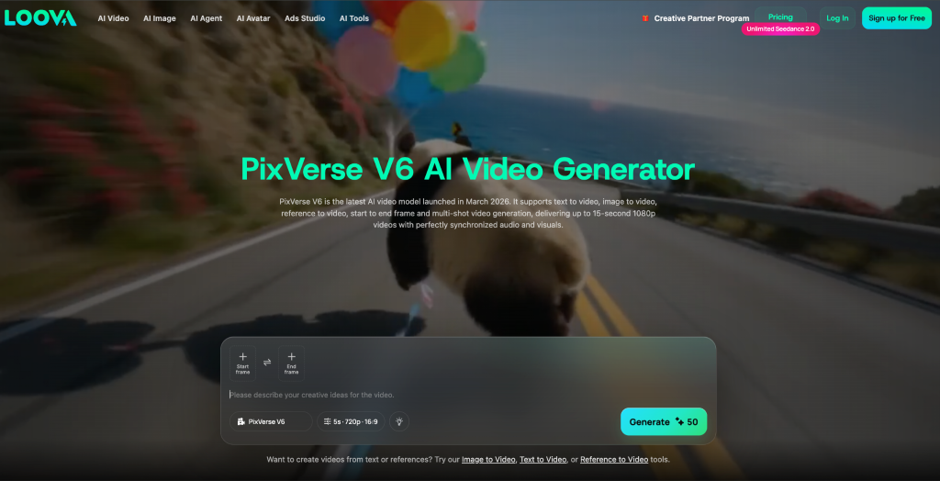
This model is particularly ideal for users who want to convert images into polished short videos without the steep learning curve of professional, complicated production software. It supports a wide range of image inputs, including portrait shots, hand-drawn illustrations, and product photography, generating vivid animations that fit perfectly for social media posting and short-form content distribution.
In addition to efficient one-click generation, PixVerse V6 serves as a flexible sandbox for creators to experiment with different animation styles and creative ideas. While professional filmmakers may still favor more advanced models with comprehensive custom production controls, PixVerse V6’s balanced strengths in usability, speed, and visual quality make it a highly practical choice for daily social media content creators pursuing both efficiency and attractive visual results.
Runway Gen-4
Runway Gen-4 is meant for professionals seeking more consistency and control over their AI-generated videos. Runway's ability to convert an image to video gives users an opportunity to use an image and explain how that scene should progress.
One of its main advantages lies in consistency across characters, objects, and scenes.
This feature proves to be quite handy when you need to make several shots within one production, because with the help of AI consistency can be quite hard to achieve.
Another feature of Runway is its integration within an ecosystem that deals with the generation and editing of videos, which makes it quite appropriate for agencies and professionals.
Best for: Professional editors, filmmakers, creative agencies, and commercial productions.
Google Veo
Google Veo is one of the leading options among AI video generation models for creators who prioritize realism and detailed scene generation. Google Veo can understand complex prompts and create video that features natural motion, lighting, and camera work.
The use of an image as a visual prompt allows creators greater control over how their scenes look. Rather than having to write out every single detail of the visuals, they can use an existing image and a prompt for the motion.
Since the focus of Google Veo is on realism, it is well suited for professional video applications such as advertisements, cinematic ideas, and product promotions.
Best for: Professional video production, ads, agencies, and cinematic videos.
OpenAI Sora
OpenAI Sora is made to create elaborate AI videos and storytelling. It can generate complicated scenery and scenes while understanding relationships between objects and the subjects.
For content creators, Sora may come in handy when creating fanciful ideas that might need some places, people, props, or special effects to materialize. Sora can also assist users in starting with an image as opposed to using a text-based generation only.
The best case to use Sora is when you are trying to translate an idea into a visual concept in video format.
Sora shines when used for ads, creative ideas, story creation, and visual experimentation. Sora will prove helpful when translating ideas into videos.
Best for: Storytelling, advertising, creative ideas, and visual development.
Hailuo AI
Hailuo AI provides an easy solution to generate short AI video from images and prompts. Being simple to operate, it can be used by novices, small business owners, and those who need content on a regular basis.
One of the most common scenarios is transforming static marketing images into video content. For instance, one could generate a video from a picture or design to make a promotion more engaging.
It will be beneficial in cases where speed and convenience are more important than control over the process of video production.
Best for: Short-form content, promotions, small businesses, and novices.
Vidu AI
Vidu AI is a versatile software program that converts visuals and ideas into videos. It is ideal for people who upload a lot of content and require an effective way of creating visuals.
This app can help bring visuals such as product images, characters, animations, and illustrations to life for marketing and social media purposes. Its user-friendly design also helps test ideas in case the creator needs to choose a particular path to follow.
For people who want to create content using something easy to use, Vidu offers a good compromise.
Best for: Marketing videos, YouTube, social media, and creative exploration.
Which AI Model Should You Choose?
The choice of AI model that works best from images to videos depends on the purpose.
Seedance 2.0, Kling 3.0, Google Veo, and OpenAI Sora are excellent if you want natural movement. They are ideal for situations that require high-quality visuals and animation.
If your creative processes are professional in nature, then you should consider using Runway Gen-4. This application provides consistent results that are easy to use for professionals like film directors and creative agencies.
For social media users who want to create appealing videos from photos, PixVerse V6, Pika, Hailuo AI, and Vidu AI are good enough. You don't have to go through complicated procedures to get visually appealing videos for social media platforms.
Loova could be a good alternative if you want access to various AI models together in one place. It provides access to different AI video models as well as other tools.
What AI Video Creation Platforms Can Do
Most standalone AI video models are highly specialized, excelling at individual generation tasks but lacking versatility for full-cycle content creation. For creators working on diverse video projects, this means constantly switching between separate models, tools and web services to cover different production needs.
Modern integrated AI video generation platforms solve this problem by consolidating a wide range of AI-powered image and video tools into a unified operating ecosystem.

Premium all-in-one platforms support mainstream creative workflows, including image-to-video, text-to-video, and reference-driven video generation, alongside built-in AI video editing functionality. They allow users to produce complete video footage from simple inputs such as text prompts, static images, or multi-reference materials, while offering access to multiple specialized AI models to match different project styles, visual tones and creative requirements.
Beyond core video generation capabilities, comprehensive AI creation platforms expand their toolkits to cover the full spectrum of content production. Common integrated features include AI image generation, intelligent photo retouching, talking photo animation, motion transfer technology, dedicated product content generation, and AI advertising creation tools. This multi-functional design greatly benefits marketers, business teams and content creators who need to produce varied visual assets for complete marketing campaigns.
The greatest strength of integrated AI video platforms lies in their optimized, flexible workflow. Instead of juggling multiple independent websites and software for image processing, video generation and post-editing, creators can complete the entire content production process within a single interface. This unified workflow significantly streamlines production steps, reduces operational friction, and improves overall content creation efficiency.
Conclusion
In 2026, AI image-to-video is now a highly versatile tool for creating content. Artists and designers have access to models tailored to their particular style of creating videos – be it cinema-grade quality, professional-level control, fast generation, or social media-focused process.
For realistic animation, Seedance 2.0 and Kling 3.0 would suit well, while for visually rich storytelling, one should use Google Veo or OpenAI Sora. Professional-grade and consistent videos can be generated with the help of the Runway Gen-4 model, while PixVerse V6, Pika, Hailuo AI, and Vidu AI are the tools suitable for short-form content creation. Luma Dream Machine is another helpful platform that helps in storyboarding and visual concepting.
No model would work for all types of projects. The selection is based on realism level, control options, speed of work, and creative freedom. Platforms such as Loova allow one to have several models and AI production tools in one place for those who want to try them all.
Frequently Asked Questions
Which AI model creates the most realistic motion?
Google Veo, OpenAI Sora, Seedance 2.0, and Kling 3.0 currently offer the most realistic motion and cinematic animation quality.
Which AI video model is best for beginners?
PixVerse V6, Pika Labs, and Hailuo AI are beginner-friendly since their interfaces are
intuitive and the rendering is fast, so you don’t really get stuck.
Which AI model is fastest?
PixVerse V6 and Hailuo AI are among the fastest image-to-video AI models for creating short-form content.
Can these AI models animate a single image?
Yes, all the models listed above can take a still image and somehow animate it into a moving video with AI-powered motion, or whatever.
So for professional marketing videos, which of those AI models is best?
Seedance 2.0, Google Veo, Runway Gen-4, and OpenAI Sora are excellent choices for producing high-quality marketing and commercial video content.


